
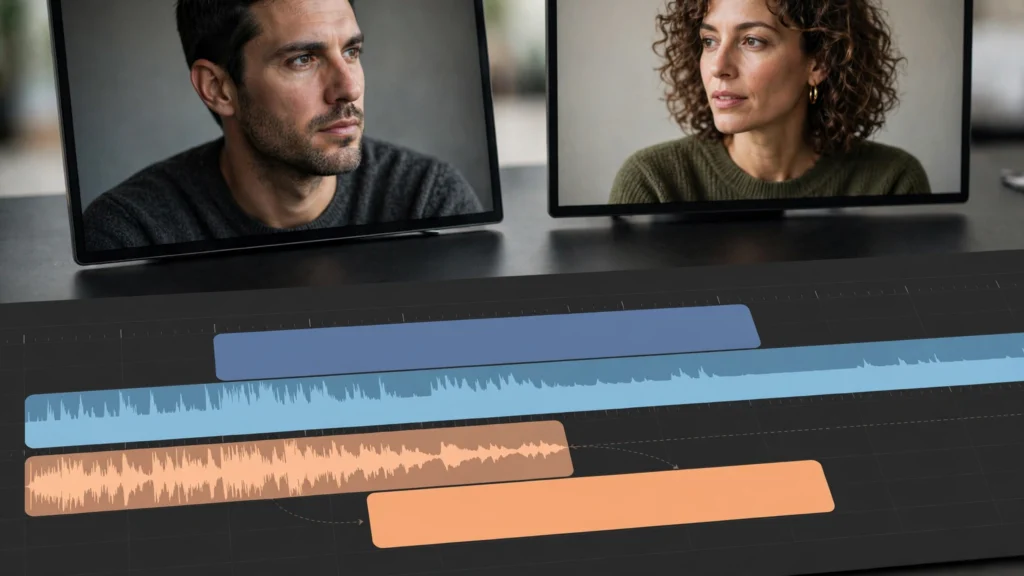
You’ve seen it. A string of gorgeous AI clips, each one good on its own, and the whole edit still feels like a slideshow. Polite. Dead. Honestly, the problem usually isn’t the footage at all. It’s the borders. The picture changes and the sound changes at exactly the same instant, every single time, in one hard step. And real scenes? Real scenes never do that. A door closes under the next line. Room sound keeps running straight through the cut. Nobody announces a new shot with silence.
So here’s the fix. It’s old — one of the oldest editing tricks there is — and it fits generated footage like it was made for it. J cuts and L cuts. Sound and picture change at different moments. That tiny offset does an absurd amount of work when every shot arrives as its own separate generation.
The Boundary Problem In Generated Edits
Think about what a filmed scene is, before anyone edits it. Continuous. Actors overlap. A door slams under the next line. Room tone runs through everything. Now think about what a generated scene arrives as. The opposite. Islands.
Every AI clip starts clean, ends clean, and carries its own thin little slice of audio — if it carries audio at all. Cut island to island and you feel every single border. Every one.
- Simultaneous change: picture and sound switching together reads like a presentation, not a place. The brain notices the edit instead of the scene.
- Clean starts: generated clips often open with a fraction of stillness — a little hiccup of nothing — and a hard cut turns that hiccup into a visible stutter.
- Thin endings: clip audio tends to decay or stop right at the boundary. That leaves a tiny pocket of dead air at every join. Listeners feel it even when they can’t name it.
- No shared space: without overlapping sound, two shots never quite agree they happened in the same room. They’re neighbors who’ve never met.
And here’s the thing — the fix isn’t a transition effect. Forget dissolves. Just move the audio edit point a few frames — sometimes a full second — away from the picture edit point. That’s it. That’s the entire technique. The rest of this article is just about using it on purpose instead of by accident.
J Cuts: Sound Arrives Early
A J cut means the next shot’s audio starts before its picture shows up. On the timeline the audio track steps left, tracing a rough letter J. Simple. We use it whenever the next moment matters enough to announce itself.
- Dialogue entries: hear the speaker’s first words over the listener’s face, then cut to the speaker already talking. The scene gains a beat of anticipation — you’re already listening before you look.
- Approaching action: footsteps, a door, a phone buzz — sound arriving early pulls the viewer forward. It says “pay attention, something’s coming.”
- Location changes: street noise or rain from the next scene bleeding in early tells the viewer a move is coming before the picture confirms it. No surprises, no confusion.
- Voiceover bridges: narration starting over the previous image keeps a sequence from feeling chopped into little captioned boxes.
One caution, though — keep J cuts short in short-form. Six to eighteen frames of lead sound is usually plenty. A full second of an unseen source stops feeling like editing and starts feeling like a mistake. This early-sound thinking connects directly to how we handle pairing voiceover with AI video, where the voice regularly walks in ahead of the picture it’s describing.
L Cuts: Sound Stays Late
The L cut is the mirror image. The picture changes, but the previous shot’s audio hangs around for a moment over the new image. On the timeline the audio steps right — sketching an L. We reach for it when the feeling of a line or a sound should outlast the face that made it.
- Reactions: a line ends, we cut to the listener, and the last words ring over their reaction. The emotion transfers instead of resetting. Big difference.
- Trailing action: a laugh, a sigh, a machine winding down — let it decay across the cut instead of amputating it at the border. Amputation. That’s what a hard cut does to a good laugh.
- Music and ambience tails: room tone or a music phrase resolving over the next shot glues two generations into one space. Glue. That’s literally the job.
- Soft exits: ending a scene on lingering sound while the picture is already somewhere new kills the stop-start rhythm that makes AI edits feel assembled by hand.
Here’s a bonus: L cuts are forgiving. Generated clips often soften or drift in their final frames — we’ve all seen it — and with an L cut you can leave the picture early while the sound finishes the thought. The flaw never gets its moment.
Split Edits In Dialogue And Reaction
Dialogue is where split edits earn their rent. And dialogue is exactly what AI generation hands you in pieces — because we typically generate one speaker per clip, a two-person conversation is already a stack of separate shots waiting to be woven. J and L cuts are the weaving.
- Cut to the listener early: when a line carries a reveal, move to the reaction before the line ends. The audience watches the impact, not the announcement. Always more interesting.
- Hold the speaker late: for a confession or a joke, stay on the speaker in audio while the picture checks the room. The voice lingers; the eyes wander.
- Protect the breath: generated speech sometimes starts abruptly — no inhale, just words. A small audio lead-in, borrowed through a J cut, restores the sense that someone breathed before speaking. People breathe. Don’t edit it out of existence.
- Stagger every join differently: and I mean differently. If every boundary offsets by the same six frames, the pattern becomes audible within three cuts. Your ear learns it. Vary the offsets like you mean it.
These are the same instincts we run across the whole finishing stage, which we lay out in editing AI clips in Premiere Pro: watch any strong scene with the sound up and notice how few lines both start and end neatly inside their own shot. Almost none. That’s not sloppiness. That’s craft.
In Premiere Pro the mechanics are simple: unlink, or use the Rolling Edit tool on the audio side only, or trim the audio clip’s head or tail independently with the audio track targeted. We keep audio and video linked by default — always — and split them only at boundaries we’ve chosen on purpose. Everywhere else, they stay married.
Audio Handles: What Generation Must Give The Edit
Look, split edits eat handles. They consume extra audio beyond the picture cut — that’s their fuel. And that fuel has to be planned before generation, not discovered in the edit while you’re already annoyed. When we prompt and generate, we ask for material the edit can actually use.
- Full lines, plus air: generate the complete line with a breath of room sound before and after. Don’t trim the prompt’s ambition down to the exact words — leave the edit some air to breathe.
- Separate voice from picture when it matters: for important dialogue, we generate or record the voice independently, so its timing is ours to move. Our process for pairing voiceover with AI video covers that separation in detail.
- Ambience beds: keep a clean room-tone or location bed under the whole scene. A continuous bed lets audio cross any border without a step in background level. Borders stop existing.
- Wild lines: a few reaction sounds — a laugh, a gasp, a short reply — generated or recorded on their own become flexible glue between shots. Cheap to make. Priceless in the edit.
Where the source clip’s audio is baked in and short, we cheat honestly: extend the tail with the ambience bed, or let a J cut from the next clip cover the join. The audience hears continuity even where the files didn’t provide it. They never ask where it came from. That’s the point.
Worked Example: A Door, A Line, A Reaction
Take a simple three-beat moment. The kind we build all the time. Someone enters a room, says a line that changes the temperature, and the other person reacts. Generated as three separate clips and cut straight, it plays like three postcards. Polite. Dead. You could frame them.
Now work the boundaries. The door sound starts under the previous shot, half a second before we ever see the room — the audience hears the next shot before they see it, and suddenly they’re leaning in. The line itself begins over the listener’s shoulder, then we land on the speaker for the words that actually matter. At the end, the picture leaves the speaker early and the tail of the line hangs over the reaction — so the face we’re watching is absorbing the words at the same time we are.
Same three clips. Same lines. But now it feels like one room, one moment, people who exist in the same air. That’s not a trick of expensive footage. It’s just refusing to let sound and picture hold hands at every cut.
Sound effects follow the same logic. A kettle click, a chair scrape, rain on a window — let them start a breath early or finish a breath late and the whole scene relaxes. Hard-sync every sound to its visible source and you get that robotic precision that gives generated work away. You know the look. Like a metronome got hired as editor.
Mistakes That Make Split Edits Sound Wrong
This technique is simple. Which is exactly why the failures are so consistent. Watch for these — we all hit them.
- Off-setting every single join by the same amount. Your ear learns the pattern in three cuts and starts hearing the edit instead of the scene. Vary it. Some boundaries want two frames, some want nearly a second, and some genuinely want to land together — a slap, a reveal, a beat drop. Save the hard cut for those. A hard cut used rarely is a weapon.
- Dragging dialogue across a change of location without any bridge. If the picture jumps from a kitchen to a street, a line floating across that jump needs street sound arriving with it — otherwise it just feels like a mistake in the export. Because it is.
- Forgetting the room tone. A voice carried over a cut into silence sounds pasted on. Keep a low, continuous bed under the exchange and the voice has somewhere to live. No bed, no home.
- Cutting the breath every time. Generated speech can start abruptly, yes — but if you tidy every inhale away, people stop sounding like people. Leave some air in. Air is free.
One practical habit helps more than any rule here: close your eyes and listen to the scene once. Just listen. Split edits are an audio decision wearing a video costume. If the blind listen flows, the picture almost always follows. Trust your ears — they’re older than your timeline.
Frequently Asked Questions
What Is The Difference Between A J Cut And An L Cut?
A J cut lets you hear the next shot before you see it — the audio arrives early. An L cut does the opposite: the picture moves on while the previous sound stays a little longer. The names come from the shape the tracks make on the timeline. Look at it once and you’ll never forget which is which.
How Many Frames Should A J Or L Cut Be?
Start small. Six to eighteen frames is a comfortable range for dialogue in short-form work — but honestly, let the material decide. A quiet reaction can carry a longer overlap than a fast exchange. And here’s the real test: if viewers can point at the edit, it’s too long. Or too regular. Probably too regular.
Can I Use Split Edits If My AI Clips Have No Audio?
Yes — and you’ll lean on them even more. Build the scene from separately recorded or generated voices, room tone, and spot effects, then place those sounds across the picture cuts deliberately. Silent clips give you a blank audio canvas. The overlaps are entirely yours to design. Honestly? Sometimes silence is easier than fixing bad baked-in audio.
Do J And L Cuts Work In Vertical Shorts?
They work beautifully. Arguably they matter more there, because vertical viewing is intimate and fast — anything that smooths a boundary helps retention. Just keep the overlaps a touch shorter than you would in a longer piece. The pace of a short forgives less wandering.
Practising On A Two-Clip Conversation
The fastest way to learn this is one small exercise. Take two generated clips of two speakers, one line each. First, cut them straight: picture and sound together. Watch it. Feel how flat it is.
Then rebuild the same exchange three ways — a J cut into the reply, an L cut out of the first line, and a reaction split where the second line plays over the first speaker’s face. Three versions. Same material. Noticeably different scenes. The third one will probably surprise you.
That difference is the lesson we keep relearning in our own edits: editing AI footage isn’t mainly about hiding flaws. It’s about creating the overlaps that real scenes have and generated clips don’t. Give sound permission to arrive early and stay late, and two clips that never shared a room start behaving like a conversation. A real one.