
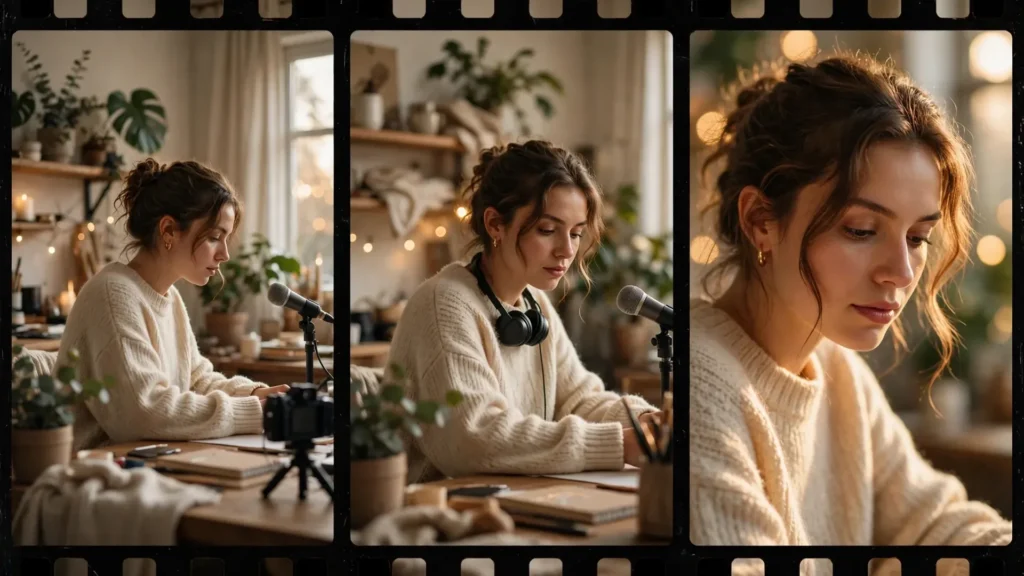
Most AI videos fail before the edit even starts. And the reason is sitting in plain sight on the storyboard: every shot is the same size. A character stands in the middle distance, walks toward camera, turns, walks away. The locations change, the costume changes, but the framing never does — so a thirty-second story feels like one long surveillance clip. Shot size is the cheapest directing tool you have in AI video. Because it costs no extra credits to ask for a close-up instead of a wide. It only costs the decision.
Real filmmakers have used the same four framing choices for a hundred years. And AI generators respond to those same choices remarkably well when you prompt them properly. A wide shot tells the audience where they are. A medium shot puts them next to a person. A close-up puts them inside a feeling. When a generated sequence moves through those distances on purpose, viewers read it as storytelling. When it doesn’t, they read it as a demo. This guide walks through each shot size — what it’s actually for, the words that make a model produce it, and a practical pattern you can reuse for a thirty-second story in Seedance 2.5, Veo, or whatever tool you’re testing this month.
The Four Shot Sizes That Carry A Story
You only need four shot sizes to direct almost any short AI video. And they’re best understood by the question each one answers for the viewer.
- Wide shot (also called a long shot or establishing framing). The full environment with the subject small inside it. Answers: where are we, and how big is this place compared to the person in it?
- Medium shot. The subject framed roughly from the waist up, with enough of the surroundings to read the action. Answers: what is this person doing right now?
- Medium close-up. Chest or shoulders up. The face becomes readable without the intimacy of a true close-up. Answers: what is this person thinking as they do it?
- Close-up. The face fills most of the frame, or a single object or pair of hands fills it. Answers: what matters most in this exact second?
Now — there are finer gradations on a real film set. Extreme wides, cowboy shots, inserts. And yes, you can prompt for those too. But if you plan every storyboard panel with one of these four labels, your sequences immediately gain the thing most AI videos lack: visual rhythm. The camera breathes in and out. The audience leans forward and settles back. That movement of attention — that’s what makes a 30-second piece feel directed instead of generated.
The practical rule from my own workflow is simple: never place two shots of the same size back to back unless you mean it. Repetition reads as an accident in AI video. Because the audience has learned, from years of watching generated content, that same-size-same-size usually means nobody storyboarded the piece. Two wides in a row can work as a deliberate pause. Two mediums in a row almost always looks like a skipped step.
Wide Shots: Selling The World
The wide shot does one job: it sells the world before you ask the audience to care about anyone in it. In a short AI video, you rarely have time for a long, slow establishing moment, so the wide has to work fast. One to two seconds of a city street at dawn. A kitchen before anyone enters it. A shoreline with a single figure standing at the edge. That’s enough for the viewer’s brain to file the location away and stop asking where things are happening.
Wide shots are also where AI models quietly shine. At wide framing, faces are small, hands are tiny, and most of the frame is architecture, landscape, and light — exactly the things current models render most convincingly. A wide that would expose every flaw in a close-up often looks genuinely beautiful. Which makes the wide shot your safest opening frame and your best transition tool. When two scenes don’t connect cleanly, a fresh wide of the new location resets the audience’s expectations in a single cut.
Prompting a wide is mostly about protecting the subject’s smallness. Models love drifting toward the subject and cropping in, because their training data is full of centered, prominent subjects. Counter that by describing the environment first and the person second — and by giving the camera a reason to stay back: the scale of a building, a crowd moving through a station, weather rolling over a field. Describe what the wide is for — arrival, isolation, scale, calm before trouble — and the framing follows the intent. I also keep wide shots simple in motion terms: a slow push-in, a gentle pan across the space, or a locked frame with movement inside it. Complicated camera moves at wide framing tend to smear fine detail. And the wide is where your detail is.
One thing, though: don’t open every video with a wide. For hook-driven short-form, open on a face or action and earn the wide seconds later. The first two seconds belong to whatever stops the scroll; the wide’s job starts once the viewer decides to stay.
Medium Shots: The Workhorse And Its Trap
If wide shots sell the world, medium shots do the daily labor of the story. Actions live here: cooking, typing, packing a bag, arguing across a table, handing something over. The subject is large enough that hands and props read clearly, and the frame still holds enough environment that the audience never loses the geography. On a real set, the medium is where coverage lives. Same in AI video — when you’re unsure how to frame an action beat, the medium shot is rarely the wrong answer.
The trap is that the medium is also the model’s default. Ask a generator for “a woman making coffee in a kitchen” with no framing language and you’ll get something close to a medium shot nearly every time — because that is the statistical center of how people and actions get photographed. Left to defaults, an entire video collapses into mediums. And mediums are the least expressive size: too far for emotion, too close for spectacle. The fix is not to avoid mediums — you need them — but to use them on purpose. As the connective tissue between the wides that orient and the close-ups that land.
Two habits keep medium shots working in my projects. First, I give the medium a job in the storyboard. “Medium — she notices the letter on the counter” is a shot with a reason; “medium — she is in the kitchen” is a screensaver. Second, I vary the angle within the size: a medium from slightly above, a medium over a shoulder, a medium with the subject off to one side of the frame. Same size, different energy. AI models handle these variations well because they describe relationships — and relationships are what mediums are for.
Close-Ups: Faces, Hands And Honest Emotion
The close-up is where AI video earns or loses the audience’s trust. Because the close-up is where the model’s weaknesses sit closest to the camera. Eyes drift. Teeth soften. Hands gain and lose fingers mid-gesture. None of that means avoid close-ups — it means spend your effort here. Because a close-up that works does something no wide or medium can: it makes the viewer feel something specific.
Use close-ups sparingly and with intent. In a 30-second story, two or three real close-ups are usually plenty: the reaction that turns the story, the object that matters, the face at the moment of decision. Because close-ups carry this much weight, I generate the important ones from stills — build the exact frame as an image first, check the face and hands at full resolution, then animate it. That image-to-video step is the single most reliable way I know to get an honest expression out of a model. And it pairs naturally with the reference-image workflow described in the guide to consistent characters from reference images: the same anchored face, framed tight, holds up far better than a face the model invents fresh at close range.
Not every close-up needs a face. Some of the hardest-working shots in short AI video are close-ups of hands and objects: fingers tightening on a steering wheel, a key turning, a phone screen lighting up in the dark. These carry emotion without asking the model to perform it, and they cut beautifully against a medium — the audience supplies the feeling themselves. When a face close-up keeps failing after two or three generations, I reframe the beat as a hands or object close-up before I burn more credits. More often than not, the replacement shot is the stronger one. That happens a lot.
Performance in close-up should be prompted small. Models overact when asked for big emotion. “She realizes the door is unlocked” rendered as a wide-eyed gasp looks theatrical; a slight pause, a held breath, a glance down at the handle reads as truth. Ask for one micro-action per close-up — a swallow, a blink held a beat too long, a smile that fades — and let the audience’s mirror neurons do the rest.
Prompt Words That Actually Set Shot Size
Models don’t read “close-up” as a technical instruction so much as a strong suggestion. So I stack the odds with three kinds of language in every framing-sensitive prompt.
- Name the size directly. Use the standard terms: wide shot, full shot, medium shot, medium close-up, close-up, extreme close-up. They appear constantly in film and photography captions, and models have absorbed them.
- Describe the crop in body terms. “Framed from the waist up,” “head and shoulders fill the frame,” “face fills the right half of the frame.” Body-based descriptions are unambiguous in a way abstract size words are not.
- Describe what the edges exclude. “No environment visible behind her,” “the counter and shelves out of frame,” “only her hands and the envelope in frame.” Telling the model what is not in the shot pins the framing down better than any single keyword.
Combine all three in the shots that matter: “Close-up, head and shoulders, her face fills the left half of the frame, the room behind her completely out of focus and barely visible.” That’s four framing signals pointing the same direction — and in practice it lands the shot size far more reliably than any one of them alone. For wides, reverse the stack: environment first, subject placed small within it, and a note on how much of the frame the subject occupies. “The figure takes up less than a quarter of the frame height” works surprisingly well.
Camera language helps too, and it deserves its own study. The dedicated guide to camera movement in AI video prompts covers how moves like slow push-ins and tracking shots interact with framing. The short version for shot size: a slow push-in during a medium effectively walks the audience toward a close-up without a cut. Beautiful transition. But only prompt subject movement and camera movement deliberately — or the model will improvise both at once.
A Size Pattern For A 30-Second Story
Here’s a pattern I reuse constantly, mapped to a simple 30-second story — a woman arrives at a closed bakery she used to work at, finds a note taped to the door, and smiles. Generated as six clips, cut tight in Premiere Pro:
- Wide (0–4s). Empty street at dawn, shuttered shops, one figure walking into frame small. The world, sold in one shot.
- Medium (4–9s). Waist up, she walks the last stretch, bag over her shoulder, slowing as she nears the bakery. Action with a hint of hesitation.
- Close-up, object (9–13s). Her hand stops mid-reach for the handle. A paper note taped to the glass fills the frame beside her fingers.
- Medium close-up (13–19s). Shoulders up, she reads. The pause does the acting; prompt one micro-action only.
- Close-up, face (19–25s). The smile arrives slowly. This is the hero shot — generated from a checked still, given the most attempts.
- Wide (25–30s). Back to the opening framing as she unlocks the door and light spills out. The story closes where it opened, one size out.
Notice the shape: wide, in, in, tight, out. The audience gets pulled steadily closer as the emotional stakes rise, then released at the end. That in-and-out breathing is the whole craft of shot size in miniature — and it works for product demos, comedy sketches, and miniature dramas alike. Sketch it on a storyboard before you generate a single frame, so these decisions happen on paper, where they’re free, instead of in the render queue, where they’re not.
Shot size won’t rescue a weak idea. And it can’t fix a character who changes faces between clips. But it is the fastest visible upgrade available to most AI creators — because most AI videos currently use one framing for everything. Decide your sizes on the board. Stack your prompt words. Save your close-ups for the moments that earn them. And your next 30-second story will feel directed. That feeling is what makes people watch to the end — and then watch again.