
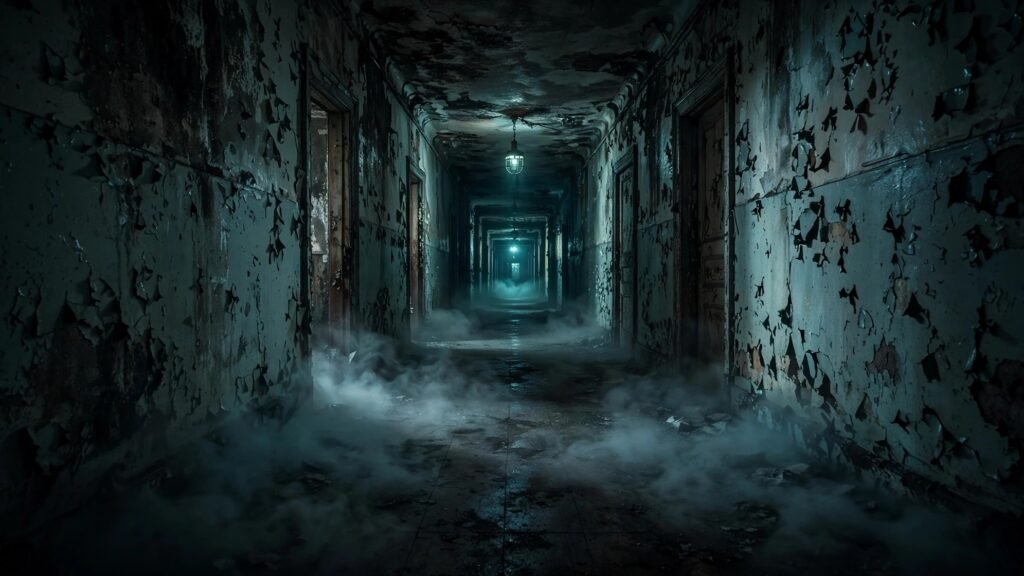
Horror is the genre where AI video should be unbeatable. Darkness hides imperfections, fog covers morphing artifacts, and audiences want to feel uneasy looking at the screen. Yet most AI horror clips are not scary — they are just dark. A dimly lit hallway with nothing happening is not horror; it is a screensaver.
Real horror comes from three things: lighting that withholds information, atmosphere that builds dread before anything happens, and timing that controls exactly when the scare lands. AI generators can do all three if you prompt them correctly. This guide breaks down horror-specific prompting — the lighting language, the atmosphere recipes, the creature reveal formula, and jump-scare timing — with example prompt blocks you can adapt for your own scary scenes.
Why AI Horror Usually Fails (And the Fix)
Most failed AI horror prompts make the same error: they describe the monster but not the fear. “A scary demon in a dark room” gives you a well-lit demon standing in a room. The model rendered exactly what was asked — the prompt just asked for the wrong thing. Horror is not about the creature; it is about the anticipation of the creature.
The fix is to prompt the scene in two beats: the dread beat (empty space, wrong-feeling atmosphere, something slightly off) and the reveal beat (the scare itself). AI video clips are short, so you often need to choose one beat per clip and edit them together — which is actually how real horror films are constructed anyway. Before we go further, if you are new to framing scary shots, the shot sizes guide covers which framings create claustrophobia versus vulnerability.
The Horror Prompt Formula
Every effective horror prompt I use follows this structure:
- Location with wrongness — a normal place with one unsettling detail (abandoned, decaying, too quiet).
- Light as information control — what the viewer can and cannot see. Flickering, partial, moving shadows.
- Camera as victim — handheld, slow push-in, or POV. The camera should feel like a person, not a drone.
- Sound-adjacent visuals — describe things that imply sound: dust falling, a swinging door, breath fogging in cold air.
- The beat — dread (nothing happens, but everything feels wrong) or reveal (the scare lands).
POV shots deserve special mention for horror — putting the viewer inside the scene multiplies the fear. My POV prompting guide covers the first-person techniques that make horror clips feel dangerously real.
Lighting Prompts That Create Dread
Lighting is 70% of horror. These are the setups that work reliably in AI generators:
Horror dread beat, abandoned hospital corridor at night, single flickering fluorescent light halfway down the hall, deep shadows swallowing both ends of the corridor, cold blue-green color cast, dust particles drifting through the light beam, slow handheld push forward, flicker timing irregular and unsettling, 35mm film grain, oppressive silence made visibleNotice what this prompt does: the scare is the absence of information. Both ends of the corridor are swallowed by shadow, so the viewer’s imagination fills them with threats. “Irregular and unsettling” flicker timing matters — rhythmic flicker feels mechanical, irregular flicker feels wrong. Other reliable horror lighting setups: moonlight through broken blinds (striped shadows), a single candle in a large dark room (tiny warm island in blackness), and emergency red lighting (institutional dread).
Atmosphere: Fog, Decay, and Wrong Details
Atmosphere is what makes a location feel haunted before anything happens. AI generators are excellent at atmosphere because it is mostly texture and lighting — their strengths. The key is layering: never rely on one atmospheric element.
Gothic horror atmosphere, decaying Victorian parlor, dust-covered furniture under white sheets, fog rolling across the floor, cobwebs in corners catching faint moonlight, a rocking chair moving slightly with no one in it, desaturated cold color grade, slow lateral camera drift, deep focus, everything still except the chair, deeply unsettling quietThe “wrong detail” technique — the rocking chair moving on its own — is what elevates this from spooky wallpaper to actual horror. One impossible detail in an otherwise still scene creates more fear than any monster. Other wrong details that work: a door slowly swinging in a windless room, a child’s toy in an abandoned place, footprints appearing in dust. Pick exactly one per clip; two wrong details in one shot reads as busy rather than scary.
Creature Reveals: The Money Shot
The reveal is where most AI horror falls apart, because generators struggle with detailed creatures in motion. The professional solution — used in real films for budget reasons too — is to never show the whole creature. Prompt partial reveals:
Horror creature reveal, tall shadowy figure standing at the end of a dark hallway, seen only as a silhouette against faint moonlight from a broken window, unnaturally long limbs, head tilted at a wrong angle, figure completely still, sudden subtle movement — head snaps toward camera, high contrast silhouette, deep blacks, handheld camera with slight shake, 35mm grain, terrifying and briefThree rules for AI creature reveals. First, silhouette over detail — darkness hides the model’s weak anatomy rendering. Second, stillness, then one movement — a completely still figure that suddenly moves is far scarier than a creature walking around, and it is much easier for the model to render. Third, keep it brief — the reveal should be the last two seconds of the clip, not the whole clip. For aerial horror establishing shots (the haunted house on the hill), the drone prompting guide covers the slow-descend moves that work best for dread.
Jump-Scare Timing in Short Clips
Jump scares are editing as much as prompting. The formula: 80% tension build, 20% scare. In a 10-second AI clip, that means eight seconds of slow dread and a two-second payoff. Prompt the two beats as separate clips and cut them together — do not ask one clip to do both jobs.
For the scare beat itself, prompt sudden motion toward camera: “figure lunges directly at the lens,” “face fills the frame abruptly,” “violent whip-pan toward the threat.” The scare clip should start calm for one beat — the contrast between stillness and violence is what triggers the flinch. Then cut to black or to the aftermath. Never linger on the scare; the audience’s imagination will always be worse than what the model rendered.
Sound Design: Half the Scare
AI video generators do not produce reliable audio, so your horror sound has to be added in post — and it matters enormously. Silence, low drones, and sudden stingers do as much work as the visuals. When cleaning up AI-generated dialogue or ambient audio for horror scenes, the voiceover cleanup guide covers removing the harsh artifacts that break immersion. And for getting your scare stingers to hit at the right impact level without distortion, check the loudness guide — a jump scare that clips sounds cheap instead of terrifying.
Horror Subgenres: Prompting Different Fears
Not all horror works the same way, and your prompting should match the subgenre. Each has its own visual grammar:
- Slasher: POV-heavy, fast movement, the killer’s perspective. Prompt “killer POV stalking through dark house, heavy breathing implied, handheld and urgent.” Keep clips short and violent.
- Gothic: Slow, atmospheric, architectural. Crumbling mansions, candlelight, period costumes. The dread comes from scale and decay — wide shots, slow drifts, deep shadows.
- Psychological: Subtle wrongness in normal settings. A suburban kitchen where one cabinet door hangs open. Bright lighting makes it worse — horror in daylight feels more violating than horror in darkness.
- Found footage: The easiest AI horror style because imperfections are the aesthetic. Prompt “amateur handheld footage, night vision green tint, timestamp in corner, sudden violent camera drop” — the rawness hides every AI artifact.
Pick one subgenre per video. Mixing slasher energy with gothic pacing confuses the audience about what kind of scared they should be. Consistency in subgenre also helps you build a recognizable horror identity, so viewers know exactly what flavor of fear to expect from your channel.
5 Horror Prompting Mistakes to Avoid
- Showing the monster too clearly. Detailed creatures expose AI weaknesses. Silhouette and shadow are your friends.
- Even, bright lighting. If the viewer can see everything, there is nothing to fear. Withhold visual information deliberately.
- Static cameras. Locked-off shots feel safe. Handheld, slow push-ins, and POV make the viewer feel present — and vulnerable.
- Scare in every clip. If everything is a jump scare, nothing is. Alternate dread beats and reveal beats.
- Forgetting the wrong detail. Atmosphere without one impossible element is just a dark room. Always include the thing that should not be happening.
Horror is the genre where AI video’s weaknesses become strengths — if you prompt for shadow instead of detail, dread instead of action, and implication instead of exposition. Start with the dread-beat formula, master one lighting setup, and build from there. The scariest thing on screen is always what the viewer cannot quite see, and no generator renders “cannot quite see” better than one you have pointed at the darkness on purpose. Test your scares on someone else before publishing; if they flinch, you have done it right.