
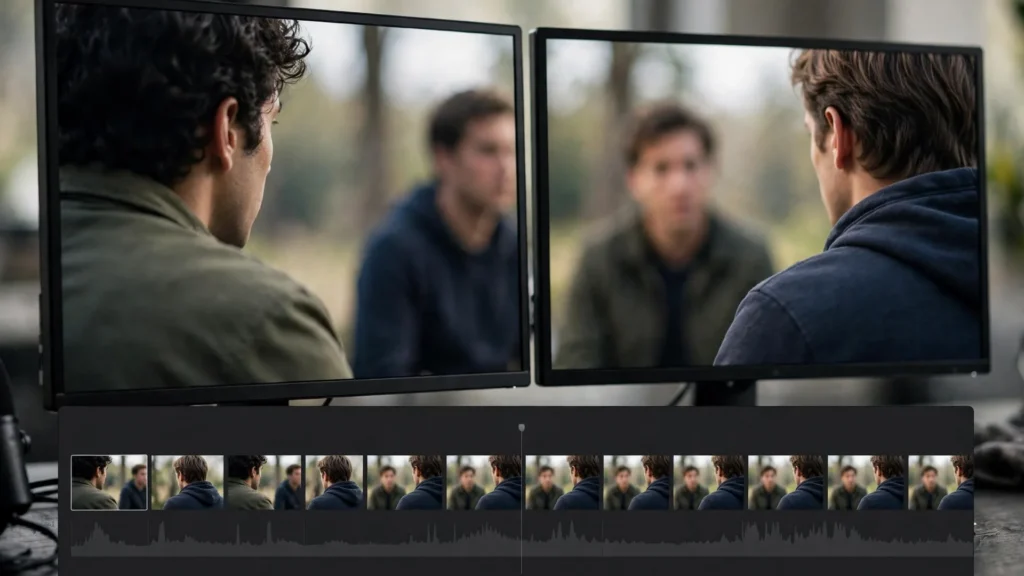
Two people are talking, and neither of them was ever in the room. That’s the strange, ordinary reality of dialogue in AI video: we generate one speaker at a time — often one line at a time — and the conversation doesn’t exist anywhere until an editor builds it.
Get this right and viewers forget the trick entirely. They just watch two characters talk. Get it wrong and every line lands like a separate announcement, read aloud by strangers taking turns. The difference lives almost entirely in the edit. So let’s talk about how we assemble conversations that feel overheard rather than assembled.
The Conversation Is Built, Not Generated
Accept this first, because everything else follows from it: the generation stage gives us performances, not scenes. A clean clip of someone delivering a line is raw material. The scene — the timing between lines, the reactions underneath them, the feeling that one person caused the other’s words — is manufactured at the timeline.
That’s not a weakness of the medium. Traditional film editors build conversations exactly the same way, out of coverage shot at different times, selecting takes and deciding where the audience looks while each line plays. Our footage happens to come from Seedance or Veo instead of a set, but the editor’s job is identical. And our storyboard-first planning already anticipates it: the board plans shots and reactions, not recordings of chats. That planning sits within the whole production path we describe in our prompt to final cut workflow.
- Plan reactions at the board stage: for every important line, decide whose face the audience should be watching. If nobody planned it, the edit will default to watching whoever’s talking — which is the dullest available choice.
- Generate listening as well as speaking: a nodding, reacting, or simply attentive version of each character is some of the most valuable footage in a dialogue edit. It’s also cheap to generate, because nothing needs to sync. Cheap and valuable is a rare combination. Take it.
- Keep voices separate where it counts: independent voice tracks give us freedom to overlap, tighten, and breathe the conversation in ways baked-in clip audio never will.
Laying The Audio Spine First
We build dialogue scenes ears-first. Before placing a single picture cut, we assemble the entire exchange as audio alone: the lines in order, with the pauses, overlaps, and breaths the scene needs, sitting on a continuous bed of room tone.
Why audio first? Because conversation is primarily heard. A listener forgives a plain picture under a flowing exchange far more readily than beautiful faces delivering lines with mechanical gaps between them. When the audio spine plays like people, the picture edit becomes a series of good choices. When the spine limps, no picture trick rescues it. The spine is everything.
- Order every line and trim the dead air inside deliveries — the half-second wind-ups and trailing drift generated speech often carries.
- Set the gaps between speakers deliberately. An instant reply feels eager or scripted depending on context; a beat of silence before an answer can carry the whole emotion of a scene. Choose per line, never by habit.
- Allow small, honest overlaps where people would naturally step in — the start of an interruption, an eager agreement — while keeping the actual words clear.
- Run the room tone underneath the full scene from the first minute, so the exchange sounds like it happens in one place.
This ears-first approach is the natural partner of our voice work in pairing voiceover with AI video: in both cases, a voice performance with real timing is laid down first, and the picture is then edited to serve it. Sound leads. Picture follows.
Cutting On Lines, Reactions And Breath
With the spine playing well, picture cutting becomes a question of attention. At any moment the audience can watch the speaker, the listener, or the space between them — and the editor picks. Line by line.
Our default instincts: enter a new speaker slightly after their line begins when the previous face is more interesting, and leave a speaker slightly before their line ends when the reaction is the real story. Those small offsets — the split edits covered in their own right elsewhere in our editing guides — are what stop a conversation looking like a tennis match shot by two security cameras.
- The reveal line: stay on the listener. Let them receive it, then cut where the reaction peaks.
- The confession or the joke: stay on the speaker, and let the listener’s picture carry the aftermath — the laugh, the silence, the look away.
- The ordinary exchange: vary it. Speaker, listener mid-line, back for the tail. Uniformity is what makes built conversations feel built. If every exchange looks the same, the audience starts counting cuts.
- The breath: do not trim every inhale. A breath before a difficult line is acting. Cutting all of them out is how generated dialogue ends up sounding like a notice being read. Like a terms-and-conditions voiceover. Nobody wants that.
Watch the cut muted once. You should be able to follow who feels what, even without hearing a word. If the muted version is just faces alternating, the picture is doing clerical work instead of storytelling. Make it tell the story.
Eyeline And Screen-Direction Repairs In The Edit
Two separately generated people have never looked at each other, so their eyes won’t naturally agree. One gazes slightly camera-left, the other gazes directly into the lens as if addressing the viewer personally. Cut together naively, the conversation feels like two video calls happening simultaneously. Awkward for everyone.
Some repairs happen at generation — prompting consistent gaze directions for each character, keeping their frame positions stable. But the edit has real tools too, and we use them unapologetically.
- Flip a shot horizontally when the eyeline demands it. A mirrored frame repairs screen direction instantly — just check for reversed text, logos, or asymmetric details that would confess the flip.
- Reframe to adjust gaze height. A small reposition inside the frame can align a look that sits slightly too high or low against its partner shot.
- Cut away to buy forgiveness. A reaction, a detail of hands, a wider two-shot-style framing for a beat, and the audience stops auditing eyelines altogether.
- Keep each character on their own side of the frame across the whole scene. Once the audience learns “she lives left, he lives right,” protect that geography like it’s a physical set.
Perfect continuity is not the goal; believable geography is. Viewers track direction emotionally more than geometrically, and a scene that consistently respects left and right will feel sound even under scrutiny. Our compositing work makes a similar peace with imperfect sources — the same finishing philosophy runs through AI video live-action compositing and through dialogue alike.
Pacing Two People Who Never Met
Pace in conversation is not speed. It’s the pattern of energy between two people — who pushes, who absorbs, where the temperature rises. Since our speakers never shared a moment, that pattern is entirely the editor’s composition. Which is both the responsibility and the fun of it.
Start wide in timing, then tighten. Early exchanges in a scene can breathe a little; as the scene finds its subject, replies come quicker, overlaps creep in, pauses land only where they mean something. By the turn — and there should be a turn — the cutting is at its most alive. Then, often, one held beat: a longer pause or a lingering reaction that lets the turn register before the scene moves on.
Short scenes in vertical shorts compress all of this into a handful of lines, which makes every gap a big decision. Half a second of silence in a forty-second video is a paragraph break. Use too many and the scene feels ponderous; use none and it feels dubbed. There’s no formula. There’s only listening.
- Read the scene aloud while it plays. If you keep wanting to nudge a reply earlier, the audience will feel the same drag.
- Vary line lengths visually. A long speech held in one unbroken shot must earn it with performance; otherwise break it across reactions and let the listener carry some of it.
- Let the last line breathe differently. However the scene paced itself, the exit line wants its own shape — shorter, longer, quieter — so the conversation feels concluded rather than interrupted by the next shot.
Room Tone: The Glue Under Every Exchange
Room tone is the sound of a place being itself: faint air, distant life, the hush of a room. It’s inaudible as a sound and unmistakable as an absence. Under a generated conversation, it does three jobs at once.
First, it unifies. Lines recorded or generated at different times, with slightly different spaces baked into them, sit down together on one continuous bed and start agreeing about where they are. Second, it covers edits — every cut in dialogue becomes harder to hear when the background never blinks. Third, it gives silence somewhere to live: a pause over living room tone feels thoughtful, while a pause over digital nothing feels like the video broke.
We keep a clean tone track for each location and lay it wall to wall under the scene before mixing anything else. Where a location’s tone was never captured, a subtle, neutral ambience at low level does the job; the audience should never be able to point at it. Then voices, then effects, then music — in that order of importance, at that order of loudness. That order is non-negotiable.
Frequently Asked Questions
How Do I Make Two Separately Generated Speakers Feel Like They Are Talking To Each Other?
Build the conversation as audio first, with natural gaps and breaths, then cut picture between speaker and listener instead of always showing whoever talks. Keep each character on a consistent side of the frame, match their eyelines as closely as generation allows, and run one room tone under everything. Four habits. One conversation.
Should Dialogue Always Show The Person Speaking?
No — often the reaction is the better picture. Let reveals play on the listener’s face and save the speaker for lines where delivery itself is the point. Alternating thoughtfully is what separates a conversation from a sequence of announcements. The listener is half the scene. Show them.
How Do I Fix Eyelines That Do Not Match?
Start by checking screen direction: each person should keep looking toward the other’s side of the frame. A horizontal flip repairs many mismatches, and reframing can adjust gaze height. Where a look is badly off, cut to a reaction or detail until the geometry stops mattering. Cut away and live to fight another scene.
Why Does My Dialogue Scene Feel Slow Even Though The Lines Are Short?
Usually the gaps, not the lines. Uniform pauses between speakers feel mechanical, and trimmed breaths make deliveries rushed-then-waiting. Rebuild the gaps per line — quick where the energy rises, held where a moment needs to land — rather than spacing everything evenly. The gaps are the music. The lines are just the notes.
The Scene That Was Never Filmed
Here’s the part we still find quietly delightful: when this works, nobody asks how the conversation was made. They argue with the characters. They take sides. The scene exists in the only place scenes have ever existed, which is in the audience’s head, assembled there by timing, reactions, and two voices that learned to share a room.
So build the spine, cut for the listener as much as the speaker, guard your eyelines, and let the room tone hold it all together. Two people who never met can have a real conversation. The editor is the one who introduces them.