
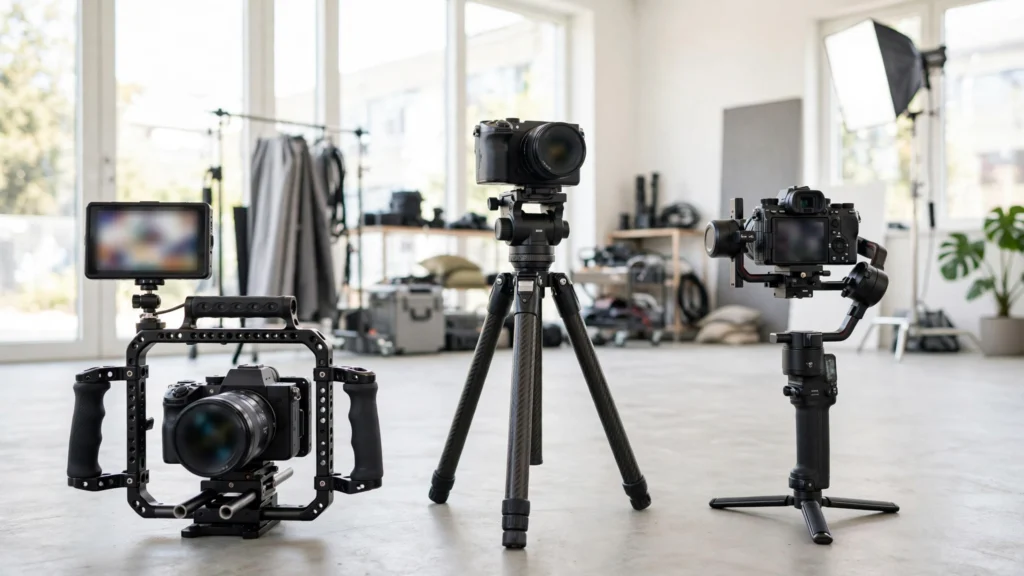
Watch any AI-generated scene with the sound off, and you can usually feel the camera before you can name it. Some clips hum with nervous energy. Some sit there like a security camera. Some glide so smoothly they feel expensive. None of that’s accidental — or, well, it shouldn’t be.
Camera energy is a storytelling decision. How still, how shaky, or how smooth the camera feels sets the emotional temperature before a word is spoken. The trouble? Most prompts say nothing about energy at all. So the model picks whatever its average training clip does — a gentle, indecisive float. In my pipeline the energy gets chosen on the storyboard, per panel, the same way shot size does.
This guide breaks down the three energies you actually need — locked-off, handheld, and gimbal smooth — what each one does to a scene, and the prompt phrasing that gets it without the seasickness.
Three Energies, Three Feelings
Think of camera energy as a dial with three marked stops. At one end, the locked-off shot: the camera doesn’t move at all, bolted to a tripod, and all the motion belongs to the subject. In the middle-low range, handheld: the camera breathes, drifts, and corrects, carrying the micro-movements of a human operator’s body. At the polished end, gimbal or stabilised movement: the camera travels — forward, sideways, rising — but without shake, floating like it’s on rails.
Each energy makes a promise to the viewer. Locked-off says “this is composed; watch what happens inside the frame”. Handheld says “you are here, this is happening now”. Gimbal says “this is under control; relax and look at the craft”. Mismatches are what feel wrong: a tender product shot that jitters reads as a mistake, and a chase that glides reads like a video game.
Models like Seedance 2.5 and Veo can produce all three convincingly. But they need the instruction, because “smooth cinematic camera” and “shaky camera” pull toward averages that serve neither. Trust me on this one.
A note on honesty: AI handheld is an imitation of an operator, and AI gimbal is an imitation of a stabiliser. Neither comes with the physical limits of the real thing — which is why you must also give them limits. Speed, distance, duration. Unbounded “handheld energy” becomes an earthquake. Unbounded “smooth movement” becomes a drone tour. The sections below give each energy its working settings.
Locked-Off: Confidence And Comedy Timing
The static shot is the most underused energy in AI video, and often the most professional-feeling. When the camera refuses to move, every entrance, exit, and gesture inside the frame gains weight. Think of the deadpan comedy of a fixed kitchen shot where chaos unfolds in front of an unblinking camera. Or the confidence of a product sitting centre-frame while hands work around it. Stillness is a statement: nothing here needs help.
Locked-off also has a production advantage that matters at generation time. A static camera gives the model one less thing to invent. Backgrounds stay put, proportions hold, and faces drift less because the frame isn’t being re-rendered from a new viewpoint every fraction of a second. For dialogue close-ups, hands-at-work inserts, and product heroes, static is frequently the highest-quality option. Not the cheap one. The best one.
In my own work I board static for any shot where the performance is the whole point — the camera stepping back is a feature, not a compromise.
Prompting it is almost embarrassingly simple: “static locked-off shot”, “fixed tripod camera”, “camera does not move”. Say it plainly. Models sometimes read silence about the camera as permission to drift slowly forward, so the explicit negative earns its words.
What to watch in review: a locked-off generation that still breathes slightly at the edges, which a few models add as fake “life”. It usually passes unnoticed, but across a multi-shot sequence, inconsistent micro-drift can make cuts feel unstable. Our AI video QC checklist flags it under background stability, and the fix is a re-roll — not a prompt rewrite.
Handheld: Urgency Without The Seasickness
Handheld energy says a person is present. It suits arguments, chases, confessions filmed by a friend — anything where polish would lie. The craft is in the dose. Real handheld has two components: a slow, low-amplitude drift (the operator’s posture shifting) and tiny high-frequency tremor.
What kills generated handheld is amplitude. The model overshoots into found-footage horror shake, or adds a rhythmic sway that feels like the camera is on a boat. Here’s the thing — neither of those reads as “person holding a camera.” They read as “camera problem.”
Phrasing that keeps it human:
- “subtle handheld camera, gentle natural sway” — the safest everyday setting.
- “handheld documentary camera, small unsteady movements” — more presence, still watchable.
- “handheld camera following closely, operator steps audible in the movement” — for pursuit and urgency; keep clips short.
Three working rules from my own generations. First, pair handheld with shorter shots: three to five seconds of shake reads as energy; ten reads as a problem. Second, give the operator a job — “handheld, following the runner” behaves better than free-floating shake, because the model anchors the wobble to a subject. Third, never ask for handheld plus fast subject motion plus a complex environment all at once. Something will melt, and it’ll be the face. Guaranteed.
If a take comes back too wild, reduce the wording before you re-roll the whole prompt. “Subtle” and “gentle” genuinely move the needle — in the same way “frantic handheld” will push it the other way when a panic beat truly needs it.
Worth saying plainly: handheld is also the easiest energy to fake badly in the edit. Adding shake to a smooth AI clip in Premiere rarely convinces, because real handheld shake interacts with parallax — near objects move more than far ones. Generate the energy in the shot when you can. Treat post shake as a last resort for tiny corrections.
Gimbal Smooth: The Invisible Professional
Gimbal energy is movement without texture: the camera glides forward through a doorway, slides sideways along a café counter, rises gently as a car pulls away — and the frame never trembles. It’s the default look of property tours, travel films, product films, and a lot of high-end advertising. Precisely because it draws no attention to itself. The viewer absorbs space and subject while the camera work stays invisible.
For AI generation this is home turf. Models are excellent at smooth moves because smooth moves are forgiving: no shake to synthesise, no sudden viewpoint jumps. The risks are different, though. Unspecified smooth movement tends to keep going — the camera drifts on a sightseeing tour with no destination. The fix is endpoints and speed: “slow gimbal move forward from the doorway to the table”, “smooth lateral slide, left to right, ending on the window”.
Give the glide a start, a finish, and a pace. Same as you’d brief a real operator. Our broader guide to camera movement prompts for AI video has more on naming paths and speeds.
Gimbal also flatters environments, which makes it the natural partner for establishing shots and interior tours. If a scene needs to feel expensive and calm — a boutique hotel reveal, a workshop tour, a wedding venue — stabilised glide does most of the work before wardrobe or colour even enter the conversation.
The trade-off is emotional distance. A gimbal confession can feel like a perfume advert. When the beat is raw, that polish works against you. Which is why the next decision matters more than any single prompt.
Prompt Phrases For Each Energy
A quick-reference set I keep near my shot lists. Copy the shape, swap the specifics:
- Locked-off: “static locked-off tripod shot; camera does not move; a barista works inside a fixed frame”. Add “no camera movement” in tools that reward negative phrasing.
- Gentle handheld: “subtle handheld camera with natural sway; medium close-up of a friend mid-story at a café table”. Everyday realism, vlogs, over-the-shoulder coverage.
- Urgent handheld: “handheld camera following close behind; quick, unsteady steps; short shot”. Best kept under five seconds.
- Gimbal glide: “smooth stabilised gimbal shot gliding forward through the showroom toward the hero product; slow, steady pace”. State the destination.
- Gimbal orbit (use rarely): “slow smooth orbit around the subject, quarter circle only”. Quarter and half circles behave; full orbits still challenge most models.
Two habits improve all five. Put the energy phrase early in the camera portion of the prompt — not buried after three lines of set description. Models weight early camera language heavily. And change one variable per re-roll. If a handheld take is too shaky, soften the energy words and keep everything else identical, so you learn what the words did. Prompt craft is mostly controlled experiments, and energy is the variable creators control worst simply because they rarely isolate it.
For where this camera line sits in a complete prompt, see the anatomy of a great AI video prompt.
A small confession from my own library work, so you can skip the mistake: for months I treated energy as a finishing idea — generate neutral, decide the feel later. The clips were fine and the sequences were forgettable. Because energy contrast between shots is a rhythm you compose in advance, like shot sizes. Now the energy word goes on the board in pencil — S, H, or G beside every panel — and the sequence gets read for rhythm before anything renders. Two minutes per board. Cheapest directing I do all week.
Matching Energy To The Story Beat
At the board stage I run a blunt pass: what should the viewer feel in their body during this shot? Calm and composed points to locked-off or a slow gimbal. Present and slightly unsafe points to handheld. Assured and premium points to gimbal. Then I check the sequence as a whole, because energy contrast is itself a storytelling tool.
A static wide of a quiet street makes the handheld burst through the door feel violent. Three handheld shots in a row just feel like a wobbly video. See what I mean?
A pattern that serves most short stories well: open smooth or static to establish control, let energy rise with the conflict (handheld creeps in, shots shorten), then return to stillness for the landing. Product work often runs the reverse — a handheld, human problem scene resolving into a locked-off hero shot where the product sits in perfect calm. Either direction works.
What fails is the accidental version. Where every shot carries the same vague float because nobody chose.
So the takeaway to tape next to the push-in one: choose the energy on the board, name it in the prompt, and give it limits. Locked-off for confidence and timing, handheld for presence and urgency, gimbal for invisible polish. The model can do all three. It just won’t choose between them as well as you can — that choice is the directing.