
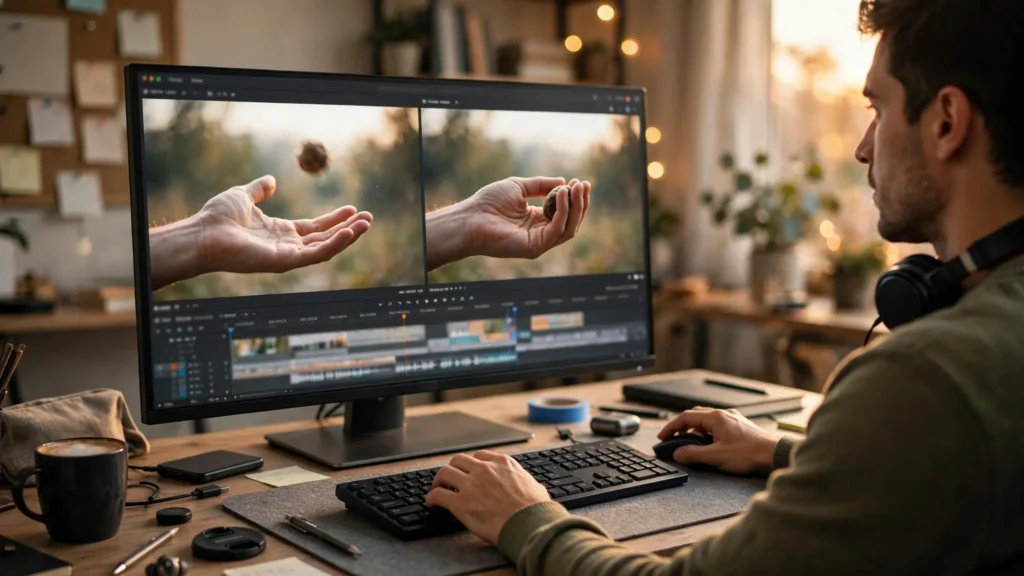
Watch a typical AI video montage and you can feel the joins. A woman walks toward a door — cut — she’s suddenly standing still in the next room while the camera settles. A car rounds a corner — cut — a different corner, car already parked. Every clip politely finishes its movement, comes to rest, and only then does the next clip begin. Like relay runners stopping to shake hands. Real editing does the opposite. It cuts while things are still moving. And that single habit accounts for a surprising amount of the difference between footage that feels glued together and footage that feels like one continuous event.
The technique has a name older than AI — older than most of the cameras your models imitate: cutting on action. Film editors discovered a century ago that if you cut in the middle of a gesture — a hand reaching, a head turning, a door swinging — the audience’s eye follows the motion across the cut and never notices the splice. For AI creators it’s doubly valuable, because our clips are manufactured separately, under different conditions, often with slightly different light and faces. Motion is camouflage. This guide covers how to prompt for clips that arrive with usable cut points built in, how to overlap and trim them in Premiere Pro, and how sound bridges finish the illusion.
Why AI Clips Feel Glued, Not Edited
Generated clips have a characteristic shape. Once you see it, you can’t unsee it. The first half-second ramps up — the subject stirs, the camera finds its move. The middle holds the action. Then the last second winds down: movement eases, the subject settles, the frame quietly prepares to end. Models do this because the videos they learned from often begin and end at rest, and because generators favor stable, complete-looking arcs. It’s a sensible default for a standalone clip. It’s poison for editing.
When you butt two such clips together, the audience feels decelerate–stop–accelerate at every join. Worse, the wind-down is where models do their sloppiest work: hands relax into odd shapes, walking cycles dissolve, faces go blank as the clip “finishes.” The final second of a generated clip is frequently its weakest second. And the glued feeling? It’s largely the feeling of watching every clip’s weakest second, back to back, at maximum visibility.
The fix isn’t better models. It’s refusing to show those edges. Cutting on action means your timeline is built almost entirely from the strong middles of clips, with cuts buried inside movements where the eye is too busy tracking to audit quality. There’s a second, subtler benefit: cutting mid-gesture lets you imply speed and energy that no single generated clip contains. Two ordinary actions, cut together at their most dynamic frames, feel like one decisive action. Editors have always known this. Now it’s your turn to exploit it.
The Principle: Cut While Something Moves
The principle in one sentence: a cut is invisible when the viewer’s attention is committed to following a motion that continues across it. The motion doesn’t even have to be identical on both sides — it has to be compatible. A hand reaching down out of frame can cut to a different hand grabbing an object, and the eye accepts it, because reaching-down flowed into grabbing. What the eye rejects is a change in the state of motion: moving to still, rising to falling, fast to slow, without the motion itself explaining the change.
Actions that hide cuts especially well, ranked from my own timelines:
- Turns. A head or body rotating carries the eye around the cut. You can change location entirely mid-turn and audiences accept it as the same movement completing — this is the engine behind half the “impossible” transitions in music videos.
- Passes through frame. Something crosses the lens — a person walking past camera, a door swinging shut, a hand wiping across. A full-frame moment of motion blur is a free cut; you can join almost anything on either side of it.
- Gestures with momentum. Reaching, grabbing, throwing, pointing, standing up, sitting down. Cut at the gesture’s fastest point, where motion blur peaks and detail is lowest.
- Camera movement. A pan or push that continues at similar speed across the cut stitches two clips even when the subjects differ. Camera motion is a shared current the eye rides.
And the movements that expose cuts? Anything slow and stately. A gentle drift, a slow walk cycle, a gradual zoom gives the eye leisure to inspect — and inspection is where generated seams get found. This is why the same creator’s montage of quick actions feels polished while their slow, moody sequence feels stitched. Mood isn’t the problem. Audit time is.
Prompting For Cut Points: Start And End Mid-Motion
Cutting on action starts before the edit — at the prompt. You want clips that begin already moving and end still moving. Clips with their handles in motion. The wind-up and wind-down still happen, but you’re going to trim them off, so your prompt’s job is to make the middle long, clear, and full of cuttable gestures.
Habits that consistently produce editable clips:
- Open the prompt mid-gesture. “Already walking briskly as the clip begins” beats “starts walking.” Models take the cue and skip the standing-start preamble, which saves you trimming dead frames at the head of every clip.
- End on an incomplete action. Ask for motion that naturally continues past the clip’s length: “walks out of frame,” “reaches toward the camera,” “turns away and keeps turning.” A clip that exits mid-action hands the editor a built-in cut point at its tail.
- Prompt one big gesture per clip. A clip where the character opens a door contains a reach, a grasp, a swing — three cut points. A clip where the character “does various things in the kitchen” contains none you can rely on.
- Keep camera language simple during the key gesture. If the subject is performing the motion you plan to cut on, a locked or gently moving camera keeps that motion clean and fast. Save elaborate moves for clips that play whole.
This connects directly to how I storyboard: every panel gets a note for what is moving at its head and tail. “In: mid-stride. Out: hand reaching for handle.” When adjacent panels share a compatible motion — stride into stride, reach into grasp — the edit nearly assembles itself. The storyboard-first workflow is usually taught as a consistency tool, but on dialogue-free action pieces I honestly get more value from it as a cutting plan.
Tool choice plays a role too. Image-to-video from a well-chosen still gives you control of the opening frame, which means you can start the clip at the exact pose mid-gesture — generate the still at the reach’s midpoint, animate forward. And when a clip’s action is perfect but too short, extending from a mid-motion frame rather than a settled one keeps the energy continuous. The broader generation-to-edit pipeline is laid out in the prompt-to-final-cut workflow; the cutting-on-action lens just adds one question to every step: where, exactly, will I cut this?
Overlap And Trim: Stealing Frames From Neighbours
In the timeline, cutting on action is an overlap game. You generate clips longer than the shots they’ll become, then you let adjacent shots overlap in action and choose the cut frame inside the shared motion. Concretely, my Premiere Pro routine for a three-shot action sequence — say, a runner tying a shoe, standing, and sprinting off — goes like this:
- Lay the clips long. All three on the timeline at full generated length, in storyboard order, no trims yet. Yes, it looks bloated. You are looking at raw material, not a cut.
- Find the gesture landmarks. Scrub clip one for the frame where the stand-up begins — weight shifting, hands pressing the knee. Scrub clip two for the matching moment where the stand completes. Mark both.
- Cut at the midpoint of the shared motion. Trim clip one’s tail and clip two’s head so the cut lands mid-stand, when the body is moving fastest and the blur is doing your hiding. The stand now reads as one motion photographed from two angles.
- Steal frames to tune speed. If the joined action feels slow, steal three or four more frames from both sides of the cut. If it feels rushed, give two back. This micro-stealing is where the real craft lives; a four-frame difference is the difference between clumsy and athletic.
- Never cut on a blink, a foot plant, or a settle. Those are rest points. Rest points are where eyes audit, and auditing finds seams.
A note on frame-level honesty: sometimes two clips’ motions genuinely don’t match — different speeds, different limbs leading, a left hand becoming a right. Stealing frames can’t fix physics. What fixes it is cutting earlier, on the pass-through or the turn, where the gesture’s specifics are unreadable. Every editor keeps a hierarchy: match the action if you can, hide behind blur if you can’t, and restructure the sequence if neither works. Regenerating one clip with a corrected prompt (“leading with the right hand this time”) is always available and often cheaper than an hour of timeline surgery.
Speed ramping deserves a mention. A subtle ramp — 90 percent speed easing into the cut, 110 percent out of it — exaggerates momentum and smooths mismatched motion beautifully. I use it the way cooks use salt: small amounts everywhere, noticeable nowhere. The export side of all this is covered in the Premiere Pro editing guide, but no export setting will save a cut placed on a rest point. Placement first, polish second.
Sound Bridges That Sell The Lie
Picture cuts get audited by the eye; continuity gets believed by the ear. A sound bridge — audio that flows unbroken across a picture cut — convinces the audience that time and space are continuous even when the images were generated days apart. This is the single cheapest illusion upgrade available to AI creators. Why? Each generated clip arrives acoustically naked, and any continuous sound you lay underneath instantly outranks the visual seams.
Three bridges I use constantly. The ambience bridge: one room tone or street bed under the whole sequence, never dipping at cuts. The ear hears one place; the eye forgives the rest. The action bridge: the sound of the gesture starts before the picture cut or finishes after it — you hear the door begin to swing while still on the previous shot, or hear the footstep land after we’ve already cut to the new angle. The brain fuses sound and motion into one event occurring in one space. And the music bridge: a steady track whose beat your cuts respect. Cutting on action and on the beat is the closest thing short-form has to a cheat code.
The failure mode to avoid: cutting sound and picture on the same frame everywhere. That metronomic lockstep is a big part of the glued feeling, and it’s entirely self-inflicted — generated audio per clip, joined at the same points as the video, resetting at every seam. Decouple them. Let audio lead by a few frames, trail by a few frames, run underneath untouched. The picture can jump; the sound must flow.
Do the work in this order on your next sequence: storyboard each shot’s in-motion and out-motion, prompt for gestures that start and end unfinished, overlap and steal frames until the actions fuse, then lay one unbroken bed of sound under everything. The result won’t look like a better generation. It’ll look like a better film — which, at the end of the day, is the only upgrade the audience actually sees.