
Keeping one character consistent across a single clip? Solved problem. A reference image and a careful prompt handle it. Keeping the same character consistent across thirty clips, five episodes, three months of production, and two model updates — that’s a different discipline entirely. Faces drift. Wardrobes mutate. Hairstyles change between scenes. The character your audience met in episode one is a stranger by episode four. And no single trick fixes it, because series-scale consistency isn’t a trick. It’s a system.
This guide covers that system: the reference sheet method scaled for series work, character bibles that lock every visual fact, wardrobe/angle/lighting locks, seed-plus-reference combinations, a catalog of what breaks consistency (and how to fix each break), and multi-episode planning that stops consistency debt from accumulating. If you’re building episodic content, a recurring host or mascot, or any project where the same face appears across dozens of generations — this is the operational manual.
Why consistency breaks at scale
Single-clip consistency fails for familiar reasons: vague descriptions, no reference image, too much motion. Series-scale consistency fails for different reasons. Understanding them changes the solution:
- Description drift. You describe the character slightly differently in each prompt — “short dark hair” becomes “dark cropped hair” becomes “black short haircut.” Each variation is small; across forty prompts they compound into a different person. Humans paraphrase naturally. Models treat paraphrases as different instructions.
- Reference decay. You start with one reference image, then use a generated frame as the next reference, then a frame from that as the next — each generation introduces small deviations, and after five hops the character has drifted noticeably. Like a photocopy of a photocopy.
- Context contamination. The character looks right in close-ups but wrong in wide shots, or right in daylight but wrong at night. The surrounding context — lighting, composition, other elements — pulls the model’s rendering of the face in different directions.
- Model updates. The tool updates its model mid-series. Same prompt, same reference, visibly different face. This is outside your control and must be planned for, not prevented.
- Production fatigue. By clip twenty-five, you’re rushing, skipping the reference image, paraphrasing the description. The system breaks because the human operating it got tired. The best consistency system is one you’ll actually follow on a deadline.
Every technique below addresses one or more of these failure modes. And the system works because it’s redundant — no single point of failure can break the character.
The reference sheet method, scaled for series
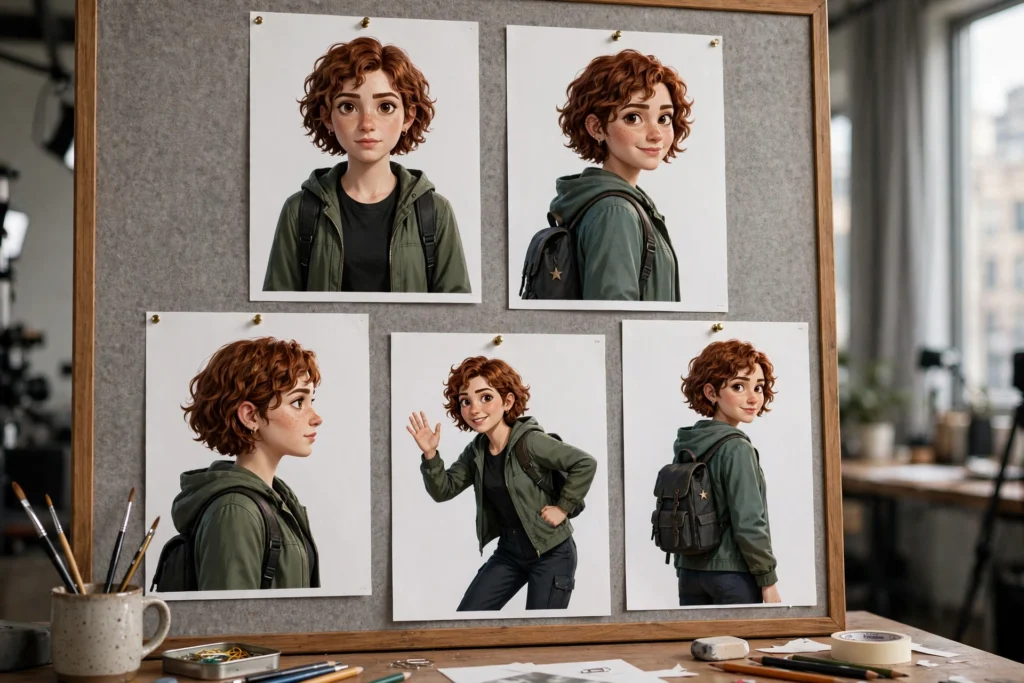
The foundation is a master reference sheet: a set of canonical images that define the character once, used for the entire series. Not one image — a set. Because a single front-facing portrait doesn’t tell the model what the character looks like in profile, in different lighting, or in motion.
Building the master set
Create five to seven canonical images before episode one:
- Front portrait, neutral expression, neutral lighting. The primary identity anchor. Every generation’s reference.
- Three-quarter view. Defines the face from the angle most shots actually use.
- Profile view. Locks the silhouette — nose, jawline, hairline from the side.
- Full body, neutral pose. Locks proportions, wardrobe, and overall silhouette.
- Expressive variation (one strong emotion). Shows the face can move without breaking — smiling or concerned, whichever the series needs most.
- Lighting variation (optional but valuable). The character in the series’ dominant lighting setup — night neon, warm interior, whatever recurs most.
Generate these as images first (using an image model or your video tool’s image mode), then curate ruthlessly — all seven must look like the same person to a stranger — and then freeze them. These files are the character. Name them clearly (series_anna_front_master.png) and store them where every generation can reach them. For the image-to-video mechanics, the reference image guide covers the fundamentals.
The golden rule: always reference from the masters
Never chain references. Never use a generated video frame as the reference for the next generation. Always go back to the master set. Reference decay is the silent killer of series consistency, and the only prevention is discipline: masters in, everything else out. If a master doesn’t fit a shot (wrong angle, wrong lighting), generate a new canonical image in that setup and add it to the master set. Don’t improvise with a video frame. That’s where the decay starts.
Building a character bible
A character bible is a written document that locks every visual fact about the character in exact, unchanging language. It’s the text counterpart to the reference images, and it’s what you paste into prompts. The bible has two non-negotiable properties: it’s written once, and it’s copied verbatim forever. Forever. Not “mostly the same” — verbatim.
What goes in the bible
- Identity block (used in every prompt): The exact description, word-for-word. Example: “Mara, a woman in her early 30s, sharp jawline, short black pixie cut, small silver hoop earrings, olive skin.” This block never changes. Not a word. If you want to change the character’s look, you issue a new bible version — you don’t paraphrase.
- Wardrobe inventory: Every outfit the character wears in the series, described exactly. “Outfit A: charcoal wool blazer, white t-shirt, dark jeans, brown leather boots.” Each episode’s prompts reference the outfit by name and paste its description. Wardrobe changes happen deliberately, at documented points — never accidentally.
- Distinguishing marks: Anything that makes the face unique — the earrings, a scar, a mole, glasses. These are the details the model drops first when it’s uncertain, so they get emphasized: they’re listed first in the identity block and repeated in close-up prompts.
- What the character never looks like: Anti-descriptions for common drift. “Never: long hair, different earrings, aged up or down, different ethnicity.” This reads strangely, but it directly counters the model’s most common deviations.
Bible versioning
When the character’s look legitimately changes — new season, time jump, plot-driven wardrobe change — issue a dated bible version (v2.0) and note exactly what changed. Old episodes keep v1.0; new episodes use v2.0. This prevents the worst series failure of all: a character whose look changes gradually and accidentally, with nobody able to say when it happened or what the “correct” look even is anymore.
Wardrobe, angle, and lighting locks
Beyond the character’s face, three things cause most perceived inconsistency: clothes changing, camera angles varying wildly, and lighting shifting. Lock all three at the planning level. Not during generation — before it.
Wardrobe locks
Assign outfits per episode or per story block, and document the assignment. Episode 1–3: Outfit A. Episode 4 (flashback): Outfit B. The prompt for every shot in episodes 1–3 pastes Outfit A’s description verbatim. This sounds rigid because it is. Wardrobe continuity in live-action film is managed by a dedicated department with photo records — you’re that department now. The payoff? Viewers never get that subconscious “something changed” feeling that breaks immersion without them knowing why.
Angle conventions
Define the series’ camera language: which angles recur, and what each one is for. Talking-head segments: three-quarter view, eye level. Action beats: medium wide, slight low angle. Establishing shots: wide, no character or character small in frame. When angles follow conventions, the character gets rendered in familiar setups the model handles well — and your reference set already covers those angles. Random angles are where context contamination hits hardest. Conventional angles are the defense.
Lighting locks
Define two or three lighting setups for the whole series and reuse them. “Day interior: soft window light from the left, warm practicals in background.” Every prompt in that setup pastes the lighting description verbatim. Lighting is the subtlest consistency factor — viewers can’t articulate it, but a character lit warmly in one scene and coldly in the next reads as “different,” even with the same face. Honestly? The lighting section of your bible is as important as the face description.
Seed + reference combinations
Reference images handle identity; seeds handle composition. For series work, combine them deliberately:
- Lock a seed per recurring setup. If your talking-head segments always use the same framing, find a seed that produces that framing reliably with your reference image, and reuse it. Same seed + same reference + same prompt structure = near-identical setups across episodes. This is how recurring segments (intros, outros, explainer beats) achieve broadcast-level consistency.
- Roll seeds for variety within constraints. Action scenes need varied compositions. Keep the reference image and identity block locked, roll the seed for each shot, and curate. The character stays constant (reference + bible) while the compositions vary (seed). This is the correct division of labor between the two controls.
- Document working combinations. “Talking head setup: seed 77412 + anna_threequarter_master.png + identity block v1.0 = approved framing.” Save these as presets. When episode six needs a talking-head segment, you’re one generation from a matching shot instead of ten.
This is the series-scale application of the systematic iteration method — seeds and references as a controlled, documented system rather than per-shot improvisation.
What breaks consistency and how to fix it
A diagnostic catalog for when the character drifts despite the system:
- The face is right but “off” — you can’t say why. Usually the distinguishing marks dropped (earrings gone, scar missing). Fix: move the marks earlier in the identity block and add them to the negative prompt’s inverse — describe them positively and explicitly in close-ups.
- The character ages between scenes. Models drift age without instruction. Fix: add an explicit age anchor to the identity block (“early 30s” — and in the anti-description, “never aged up or down”). Check wide shots especially; the model takes more liberties at small face sizes.
- Wardrobe details mutate. The blazer becomes a jacket, the boots become shoes. Fix: this is description drift — you’re paraphrasing the wardrobe. Go back to verbatim bible paste. If the model still mutates it, simplify the wardrobe description to fewer, more distinctive items.
- Night scenes break the face. Low light increases the model’s uncertainty, and uncertain models improvise faces. Fix: use the lighting-variation master (character in night lighting) as the reference for night scenes instead of the neutral master. Match the reference to the setup.
- Profile and action shots lose the likeness. The model knows the front view (most training data is front-facing) and guesses at others. Fix: lean on the three-quarter and profile masters for those shots. If a specific angle keeps failing, consider whether the shot needs that angle — a slightly more conventional framing that preserves the character beats a dramatic angle that loses them.
- Everything was fine until the model updated. Fix: don’t panic and don’t regenerate the whole series. Generate test shots with the new model using your masters and bible. If the drift is small, adjust the identity block slightly to compensate and document it as a bible patch (v1.1). If the drift is large, finish the current episode arc on the old model if the tool allows version selection, and transition at a planned story boundary.
Multi-episode planning
Series consistency is won in pre-production. Before episode one, decide:
- The full wardrobe plan. Which outfits appear in which episodes. No improvising outfits mid-series.
- The lighting setups. Two or three, defined and documented. New setups require new reference masters.
- The recurring segments. Intros, outros, explainer beats — anything that repeats gets a locked seed + reference + prompt preset.
- The bible version and master set. Frozen before episode one. Changes go through versioning, not improvisation.
- The review checkpoint. After each episode, compare the character against the masters — front, three-quarter, profile. Catch drift early, when it’s one episode to fix, not six.
This planning takes a day. It saves weeks of regeneration and reshoots across a series run. And it’s the difference between a series that looks like one production and a series that looks like twelve strangers’ clips edited together.
The honest truth about series consistency
Look — no system achieves 100% consistency across a long series. Faces will vary slightly. A viewer binge-watching might catch a difference you’d miss. But the goal isn’t perfection. It’s keeping variation below the threshold where audiences notice or care. Television has managed this for decades with makeup, lighting, and editing; AI video manages it with reference masters, bibles, locks, and checkpoints. The creators whose series look professional aren’t using secret tools. They’re using systems like this one — applied with the discipline to follow them when it’s tedious. Which is exactly when they matter most. For the shot-level craft that feeds into this system, the prompt anatomy guide and reference image guide are the foundations everything here builds on.