
Some of my most-watched clips open with the same shot: a slow aerial descent over a landscape, the kind of drone footage that used to cost thousands in permits and helicopter time. Now I generate it with a sentence. But aerial shots have their own failure modes — warping horizons, melting buildings, a “drone” that moves like a confused bird — and the prompt vocabulary that fixes them is specific. Here’s my complete system for AI video drone shots that actually look like drone shots.
Why Aerial Shots Fail (The Three Classic Breaks)
Before the fixes, the failure modes, because you’ll recognize them instantly:
- The rubber horizon: the horizon line bends, waves, or tilts as the “drone” moves. The model can’t hold a straight horizon during motion.
- Melting architecture: buildings stretch, lean, or pulse as perspective shifts. Worse with dense cities than open landscapes.
- Impossible physics: the camera accelerates, stops, and reverses like no real drone could — because the prompt said “sweeping, dynamic, breathtaking aerial” and the model interpreted that as chaos.
Every fix below targets one of these three. The through-line: real drone footage obeys physics, so your prompt must describe physics.
The Altitude Vocabulary: Name the Height
The vaguest aerial prompts just say “aerial view” and hope. Real drone operators think in altitude bands, and naming yours anchors the perspective:
- Rooftop height (10-20m): “low aerial, just above rooftop level” — intimate, details readable, strong parallax on nearby objects.
- Tree height (30-50m): “aerial at treetop height” — the classic establishing shot band, houses and streets fully legible.
- High aerial (100-150m): “high aerial view” — patterns emerge: road grids, field geometry, coastline curves.
- Satellite-adjacent (300m+): “extreme high aerial, near top-down” — abstract, map-like. Use sparingly; it reads cold.
I always include an altitude phrase because “aerial view” alone lets the model drift between bands mid-shot, which is one cause of the rubber horizon. Pin the height and the perspective holds.
The Angle Vocabulary: It’s Not All Top-Down
Beginners prompt “bird’s eye view” for everything. Real drone cinematography lives in the angles between horizontal and vertical:
- Oblique (45 degrees): “oblique aerial angle” — the money angle. Shows both the ground plane and vertical faces of buildings. Most cinematic drone footage lives here.
- Top-down (90 degrees): “directly overhead, top-down” — graphic and abstract. Great for patterns: traffic, crowds, coastlines, fields.
- Low oblique (20-30 degrees): “low aerial angle, near eye-level but elevated” — barely a drone shot; reads as a crane or hilltop. Intimate and human.
- Horizon-visible: “aerial with the horizon visible” — adds depth and scale. Without it, high shots feel like maps.
My default is oblique with the horizon visible — it’s the most “expensive-looking” combination and the most stable for the model, because the horizon gives it a reference line to hold. Speaking of which: explicitly writing “steady, level horizon” measurably reduces horizon warping in my tests. Name the thing you want stabilized.
Drone Moves: One Move, Described Physically
This is where most aerial prompts die. “Sweeping dynamic drone shot” is not a camera move — it’s a vibe, and the model turns vibes into chaos. Real drone moves are simple and physical. Prompt them that way:
The Five Reliable Drone Moves
- Push-in / reveal: “drone slowly pushes forward over the coastline, revealing the beach town” — the workhorse. Forward motion is the most stable axis for the model.
- Pull-back / unveil: “drone pulls back and rises, unveiling the valley” — great openers. Combines two axes; keep both slow.
- Lateral tracking: “drone glides left to right parallel to the shoreline” — pure sideways motion. Beautiful with layered landscapes.
- Orbit: “slow orbit around the lighthouse, keeping it centered” — the hardest move; only attempt on simple subjects with clean backgrounds.
- Descent: “drone descends slowly toward the village square” — powerful for transitions into ground-level scenes.
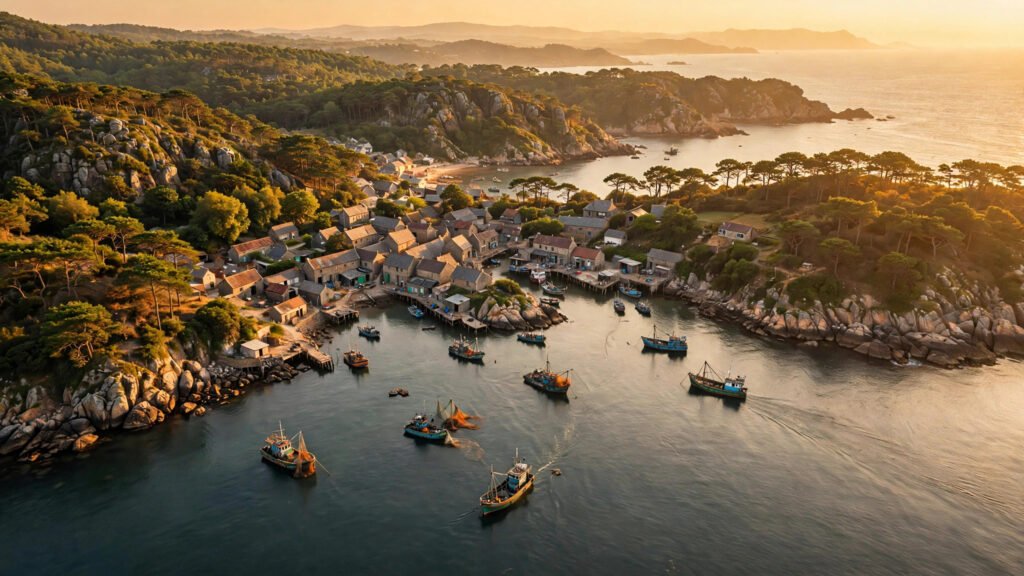
Oblique aerial at treetop height, horizon visible and level. A fishing village
on a rocky coastline at golden hour. The drone pushes forward slowly over the
water toward the village, fishing boats bobbing gently below. Warm sidelight,
long shadows across the rooftops. Steady, level horizon, smooth constant speed.
Note the physics words: “slowly,” “smooth constant speed,” “steady, level horizon.” These aren’t decoration — they’re constraints on the model’s motion. The same principle applies on the ground: I wrote about why push-in beats zoom for model stability, and the logic is identical in the air. One axis, constant speed, no drama.
Moves to Avoid
- Combined orbit + descent + speed ramp: three axes at once. The model can’t track it; buildings melt.
- “Diving” or “swooping”: aggressive vertical moves warp perspective violently.
- Any move described with “dynamic” or “dramatic”: these words increase motion energy unpredictably. Describe the geometry instead.
Subject Matter: What Flies Well and What Doesn’t
Not all subjects survive the aerial perspective. From my testing:
Flies beautifully
- Coastlines, rivers, roads: strong leading lines that guide the model’s geometry.
- Open landscapes: fields, deserts, forests — forgiving, few hard edges to warp.
- Single landmark buildings: one lighthouse, one temple, one cabin — the model can hold one structure.
- Patterns: traffic flow, crop rows, beach umbrellas — repetition is stabilizing.
Struggles
- Dense downtown skylines: dozens of buildings, all warping independently. If you must, go higher (abstraction hides warping) or slower.
- Crowds from above: people become texture; faces melt. Keep crowds small or blurred by altitude.
- Night cities with heavy neon: gorgeous when it works, but light bloom destabilizes edges. My night scene exposure words help here — “clean points of light, no bloom bleed” is worth adding.
Weather and Atmosphere From Above
Aerials live or die on atmosphere. The same weather words I use at ground level work from the air, with adjustments:
- Cloud shadows: “drifting cloud shadows moving across the fields below” — adds enormous life to high shots. One of my favorite aerial details.
- Low fog: “thin morning fog in the valleys, hilltops clear” — depth and mystery. Fog hides ground-level imperfections too.
- Golden hour: works even better from the air — long shadows create the patterns that make aerials sing.
- Rain: risky. Rain streaks at aerial scale often read as noise. If you want mood, use “overcast with dramatic clouds” instead.
For the full atmospheric toolkit, my guide to weather and atmosphere prompting covers rain, fog, and dust without the mush — the principles transfer directly to altitude.
The Flyover Sequence: Chaining Aerials Into an Opener
My favorite use of drone shots is the classic opener sequence: high and wide, descending into the story. Since most tools generate short clips, I build it as three generations on a locked visual concept:
- Clip 1 — The establishing flyover: high aerial, slow push-in over the landscape. No people, just place.
- Clip 2 — The descent: same location, treetop height, drone descends toward the specific spot where the story happens. Use the same lighting and weather words verbatim.
- Clip 3 — The handoff: rooftop height, oblique angle, drifting toward your subject. End where your ground-level scene begins.
The key is repeating the location, lighting, and weather description word-for-word across all three prompts while only changing altitude and move. Consistency comes from repetition, not from hoping. This is the same chaining discipline behind stable camera language — and honestly, the same reason lens language matters: the model holds what you name repeatedly.
Quick Aerial Prompt Template
[Angle] aerial at [altitude band], [horizon note].
[Subject/landscape] at [time of day].
The drone [one move, physical description], [speed words].
[1-2 atmosphere details]. [Lighting].
Steady, level horizon, smooth constant speed.
Filled:
Oblique aerial at treetop height, horizon visible and level.
Terraced rice fields in a mountain valley at early morning.
The drone glides left to right parallel to the terraces, slow and steady.
Thin mist in the lower terraces, a farmer's hut with smoke rising.
Soft diffused morning light, lush greens.
Steady, level horizon, smooth constant speed.
When Aerials Aren’t Worth It: Knowing When to Stay Grounded
I’ll be honest: not every video needs a drone shot. I used to open everything with an aerial because I could, and my retention data told me a clear story — aerials boost videos where place matters (travel, real estate, events) and do nothing for videos where the subject is a person talking or a product being demonstrated. A drone shot of a desk where someone unboxes a gadget is just a long, boring walk to the actual content.
My rule now: the aerial has to earn its seconds. It earns them when the location is part of the story, when the scale of a place creates emotion, or when the descent itself is the transition into the scene. Otherwise, start on the ground where the action is. The most expensive-looking shot is the one the story needs — and sometimes that’s a close-up, not a flyover. For ground-level camera craft that carries the same cinematic weight, my lens language guide is the companion piece to this one.
The Takeaway
Drone shots look expensive because real ones are expensive — and AI viewers reward that perceived production value disproportionately. The formula is unglamorous: name the altitude, name the angle, describe one physical move, and pin the horizon. Do that and your aerials stop looking like AI guesses and start looking like footage you hired a pilot for. Open your next video with one. Watch what happens to retention.