
Here is something I noticed after months of posting AI videos: my photorealistic clips get watched, but my stylized clips get shared. There is a reason for that. A photorealistic AI video is competing with every real video on the feed — and real footage usually wins that fight. A gorgeous anime-style scene or a dreamy watercolor sequence is competing with almost nothing. Stylized aesthetics are a cheat code for standing out, and most creators are sleeping on them.
In this guide I am breaking down the stylized prompt formulas I actually use: anime, 3D render, watercolor and painterly styles, and retro aesthetics like VHS and pixel art. You will get the anatomy of each prompt, the modifiers that matter, and how to keep stylized characters consistent across shots. If you want the photoreal side of the equation too, my cinematic AI video prompts guide covers that ground.
Why Stylized Beats Photoreal on the Feed
Photorealism is the default setting of every AI video tool, which makes it the most crowded visual lane on every platform. Stylized work does three things photoreal struggles with. First, it hides AI artifacts — a slightly warped hand is a disaster in photoreal but invisible in anime style. Second, it triggers stronger emotional responses; stylized visuals read as intentional art rather than fake footage, so viewers engage instead of scrutinizing. Third, stylized content is instantly recognizable as yours, which is how channels get built.
The practical upshot: if your photoreal generations keep falling into the uncanny valley, do not fight the model — change the lane. A deliberate aesthetic choice turns a weakness into a signature.
The Anime Look: Prompt Formula
Anime is the single most requested stylized aesthetic I see, and the one most people prompt badly. They write “anime style girl in a field” and get a generic result. The fix is specificity: anime is not one style, it is a family of styles, and your prompt needs to name which one.
Core Anime Prompt Anatomy
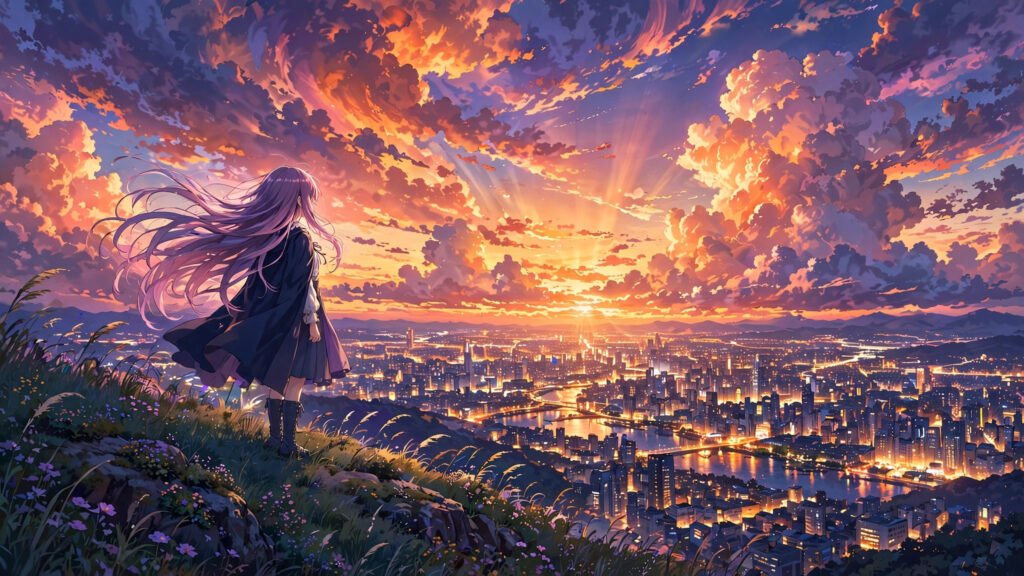
My working anime prompt formula looks like this: [style lineage] + [subject and action] + [setting and lighting] + [quality tags]. A real example: “Makoto Shinkai style anime, girl with flowing hair standing on a hill overlooking a glowing city at sunset, dramatic clouds, lens flare, vibrant saturated colors, highly detailed background art.”
The style lineage clause does the heaviest lifting. Naming a tradition — “90s cel-shaded anime,” “modern isekai anime style,” “Studio Ghibli inspired” — gives the model a coherent visual target instead of a vague vibe. The quality tags at the end (“detailed background art,” “clean linework,” “vibrant colors”) push the render away from the muddy middle that generic prompts produce.
Modifiers That Actually Change the Output
Through a lot of trial and error, I have found a handful of modifiers that reliably move the needle for anime generations: “cel shaded” for that classic flat-color look, “detailed background art” for richer environments, “dynamic composition” for more interesting framing, and “clean linework” to reduce the mushy edges some models produce. Conversely, words like “realistic” and “photorealistic” actively fight you here — leave them out entirely. One aesthetic per prompt; mixing “anime” with “photorealistic” gives you the worst of both.
3D Render and Pixar-Style Prompts
The 3D animation look — soft Pixar-style characters, glossy Blender-style renders — is the friendliest stylized aesthetic for beginners because audiences already love it and models render it cleanly. The formula: “3D animated film still” + [character description] + [action] + [soft studio lighting] + [render quality tags].
Example: “3D animated film still, cute robot with big expressive eyes waving hello, cozy workshop interior, soft volumetric lighting, subsurface scattering, octane render, high detail.” Phrases like “subsurface scattering” and “soft volumetric lighting” are doing real work — they push the model toward that soft, expensive-looking CG skin and light rather than flat game-asset renders. This style is especially forgiving with character motion, which makes it great for dialogue scenes and expressive acting that would look creepy in photoreal.
Watercolor and Painterly Styles
Watercolor and oil-painting aesthetics are underused and gorgeous — perfect for dreamy, emotional, or nostalgic content. The prompt formula: [medium] + [subject] + [paper/canvas texture cue] + [color mood]. Example: “Delicate watercolor painting, misty lake at dawn with a small wooden boat, soft pigment bleeds, visible paper texture, muted blues and warm golds, artistic, dreamlike.”
The texture cue is the secret ingredient. “Visible paper texture,” “canvas weave,” “pigment granulation” — these tell the model you want the medium to show, which is what separates a real watercolor feel from a blurry photo with a filter slapped on. For motion, keep camera moves slow and simple: gentle push-ins and slow pans. Fast motion shatters the painterly illusion because the “paint” cannot keep up. I pair these with soft cross-dissolve style transitions rather than hard cuts to preserve the dreamlike flow.
Retro: VHS, 90s Anime and Pixel Art
Retro aesthetics run on nostalgia, and nostalgia is one of the strongest engagement triggers there is. Three sub-styles worth knowing:
VHS/analog horror-adjacent: “VHS footage, tracking lines, timestamp overlay, dim living room, CRT glow, 1980s home video aesthetic.” The imperfections are the point — prompt them in deliberately. This pairs naturally with darker content; my horror prompt guide uses several of these techniques.
90s anime: “1990s cel animation style, visible film grain, slightly faded colors, hand-drawn look.” Distinct from modern anime — grain and imperfection sell the era.
Pixel art: “Detailed pixel art animation, 16-bit style, limited color palette, side-scrolling scene.” Pixel art is brutally honest about AI motion flaws, so keep movements simple: walks, bobs, blinks. Complex action turns to mush.
Keeping Stylized Characters Consistent
Stylized does not mean sloppy — your anime protagonist still needs to look like the same person in every shot. The workflow I rely on: generate one strong character reference image first, then feed it back as an image reference for every subsequent clip, with an identical character description block in each prompt. “Girl with long lavender hair, amber eyes, dark blue cloak” must appear word-for-word every time; paraphrasing between prompts is how characters drift.
For multi-shot sequences, generate wide, medium and close-up versions of the same scene rather than brand-new scenes — same setting, same character, different framing reads as professional coverage instead of random clips. My guide to multi-shot sequences that look professional goes deep on this coverage approach, and character and world building covers the consistency system in full.
Motion Prompts: Making Stylized Scenes Move Right
Every aesthetic has a motion speed limit, and exceeding it is the most common stylized-prompt mistake I see. Anime handles fast action well — speed lines and impact frames are native to the language. Watercolor wants slow drift. Pixel art wants stepped, simple motion. 3D render is the all-rounder.
Write motion into the prompt explicitly and simply: one verb, one direction. “Hair flowing in wind, camera slowly pushing in” beats a paragraph of choreography. And when the model gives you flicker — stylized generations flicker more because every frame is a fresh interpretation — stabilize with the negative prompt and seed techniques I documented for exactly this problem. Locking a seed across a stylized sequence is the single biggest quality upgrade most creators are missing.
Testing Stylized Prompts: My Iteration Loop
Stylized prompts reward systematic testing more than any other kind, because small wording changes produce big visual swings. My loop is simple: generate three variations of the same prompt, changing only the style lineage clause each time — for example “90s cel-shaded anime” versus “modern isekai anime style” versus “painterly anime background art.” Comparing those three side by side teaches you more about your tool’s aesthetic range in ten minutes than a week of random prompting.
Keep a swipe file of what works. Every time a generation nails the look you wanted, save the exact prompt wording in a document with the output attached. Over a month, that file becomes a personal style library worth more than any prompt pack you could buy, because it is tuned to your tool, your taste and your audience. I also re-test my best prompts whenever a model updates — new versions shift aesthetic biases silently, and a prompt that produced perfect watercolor last month can drift toward photoreal after an update. Five minutes of re-testing after each update keeps the library honest.
Mistakes That Ruin Stylized Prompts
Style soup. “Anime photorealistic 3D watercolor cinematic” is not a style, it is a cry for help. One aesthetic per prompt, committed fully.
Forgetting the negative space. Stylized prompts need “no photorealism, no blurry, no watermark” style exclusions where the tool supports negative prompts. The model defaults to photoreal; you have to actively steer away.
Over-detailing the subject, under-detailing the style. Beginners write three sentences about the character and one word about the aesthetic. Flip it: the style clause deserves at least as many words as the subject.
Ignoring the era. “Retro anime” without specifying which decade gives you a mush of eras. Name the decade, name the texture, name the flaw.
Conclusion
Stylized AI video is not a compromise for people who cannot do photoreal — it is a strategic choice that hides artifacts, triggers emotion and builds recognizable channels. Pick one aesthetic, learn its prompt formula, lock your character descriptions, respect each style’s motion speed limit, and stabilize with seeds. The feed is drowning in generic photoreal clips. Give it something with a point of view instead.